What Is a Stylish Name Generator? (And How Unicode Makes It Possible)
You type a plain name. A hundred decorated versions appear. You tap one, and suddenly your Instagram bio says 𝓡𝓪𝓱𝓾𝓵 instead of Rahul. No app install. No font download. Just copy and paste.
That's the basic promise of a stylish name generator. But most people don't know what's actually happening under the hood — and that ignorance can cost them. Paste the wrong style into Free Fire, and your name turns into empty squares. Use a glitch font on a JioPhone, and it's a mess of overlapping lines.
This article explains the real mechanism behind stylish name generators. No magic. No secret fonts. Just a massive global text standard called Unicode and a simple lookup table that swaps your plain letters for fancy ones. Understanding this will help you pick styles that actually work, everywhere, every time.
1. The Trick: No Fonts, Just Different Letters
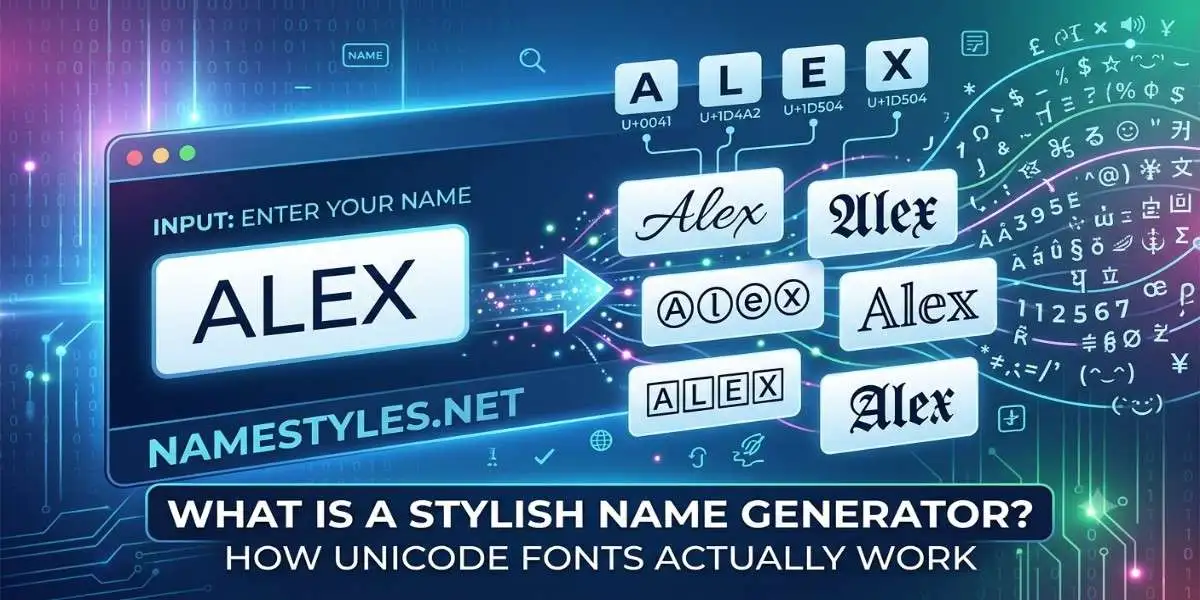
When you see “𝓡𝓪𝓱𝓾𝓵”, your brain reads it as fancy "Rahul." But to a computer, those five characters are not the same as the regular letters R‑A‑H‑U‑L. They are completely different Unicode code points.
The plain letter “A” is U+0041. The mathematical bold “𝐀” is U+1D400. The script “𝒜” is U+1D49C. The double‑struck “𝔸” is U+1D538. They all look like A, but they're separate characters, each defined in the Unicode standard.
A stylish name generator is essentially a mapping tool. It takes each character you type, finds its stylized equivalent in a pre‑built table, and replaces it. “R” becomes “𝓡”, “a” becomes “𝓪”, and so on. The output is still plain text — just text made of characters from different Unicode blocks. Because every modern device already has fonts that cover these blocks (at least partially), the styled text displays without any extra installation.
2. Where Do These Fancy Letters Come From?
They're not designed for stylish names. Unicode includes sets of styled letters for technical purposes — mostly mathematics. The Mathematical Alphanumeric Symbols block (U+1D400–U+1D7FF) contains bold, italic, script, fraktur, and double‑struck versions of the Latin alphabet and digits. These were added so that mathematical papers could write equations like “Let 𝐀 be a matrix” without relying on external fonts.
Developers realised that these characters could be repurposed. Paste them into a game name or Instagram bio, and they work — because the system fonts already include them. That's the entire secret behind every stylish name generator.
Beyond mathematical letters, other decorative symbols come from various Unicode blocks: ornamental brackets like ꧁꧂ from the Javanese script, crowns like ♛ from Miscellaneous Symbols, hearts and stars from Emoticons and Dingbats. A generator just pulls from these pre‑existing character sets and arranges them around your name.
3. The Empty Square Problem — Why Some Styles Fail
Unicode contains over 150,000 characters. No single font contains all of them. Phone manufacturers and app developers choose which Unicode blocks to support. When a character isn't included in the font, the device displays a blank square (□) — what designers call "tofu."
This happens most often with characters from rare scripts, historical symbols, or newer Unicode additions. For example, some of the more obscure Mathematical Alphanumeric Symbols (like certain fraktur letters) may be absent on budget Android phones. Stacked combining diacritics — the marks used in glitch text — are especially prone to breaking because older font engines don't handle complex mark stacking well.
That's why many generators, including NameStyles, filter out the least‑supported characters. A style that shows a square on even one common phone model isn't worth offering — it breaks the experience for anyone on that device.
4. Why the “Blue Colour” Name Is a Myth
You'll find sites promising “blue colour stylish names.” Unicode itself has zero colour information. The colour you see is determined entirely by the app or operating system. Some Samsung phones, for example, render enclosed alphanumeric characters (🅐, 🅑) with a slight blue tint — but that's a device‑specific quirk, not a Unicode feature.
No generator can guarantee a colour. What they can do is offer styles that, on certain phones, happen to look modern and premium. A responsible tool will tell you that upfront rather than making false promises.
5. Copy‑Paste: Where It Works (and Where It Doesn't)
Because the output is standard text, it works in almost any field that accepts typing. You can paste a stylish name into Free Fire and BGMI player names, Instagram display names and bios, WhatsApp display names and group titles, TikTok and Snapchat display names — practically anywhere except username fields that enforce strict character limits (like Instagram's @username).
For a detailed breakdown of which specific styles hold up best on each platform — and which ones are riskier — check out our Royal & Glitch guide, which has a dedicated compatibility section. The short version: simple symbols like hearts, stars, and basic brackets work reliably across the board; complex glitch text and obscure ornaments are where things get dicey.
6. What Makes a Generator Reliable vs. a Random Copy‑Paste List
You can find “100 stylish name” lists all over the internet. The problem: those names were made for someone else. A generator builds styles for your input, not a static example. That means you get “𝓐𝓷𝓳𝓪𝓵𝓲” if your name is Anjali, not “𝓡𝓪𝓱𝓾𝓵” with a note to replace it.
Beyond personalisation, a well‑built generator also:
- Filters out incompatible characters — ideally by testing which code points render correctly across the devices most users actually have.
- Respects platform limits — showing only styles that fit, say, Free Fire's 12‑character cap.
- Offers filtering so you can jump to styles suited for a specific game or app.
- Updates its mapping tables as new Unicode versions are released and as rendering support improves.
A static list can't do any of that. It's just a screenshot of what worked on one person's phone at one point in time. NameStyles aims to meet these standards by regularly revisiting the character sets and prioritising symbols with the widest device support.
7. Are Stylish Names Allowed? The Policy Angle
Yes. Unicode is a global standard, not a hack. No major platform bans decorative characters in display names or bios. Instagram, TikTok, Snapchat, WhatsApp, Free Fire, and BGMI all permit them. The only restrictions are on offensive content — hate speech, impersonation, or obscenity — which apply whether the text is fancy or plain.
Some games (like BGMI) have additional filters that block specific symbols if they've been associated with exploits or if they fail to render. But these are technical filters, not policy violations. Using a stylish name won't get your account suspended. Using a hateful one will, regardless of the font.
8. Frequently Asked Questions
9. What This Means for You
You don't need to memorise Unicode code points to get a name that works. You just need to use a tool that does the heavy lifting — and understand enough to avoid the obvious traps. Stick to styles that have been tested across devices, keep an eye on character limits, and test on a second phone if you're unsure. You can experiment with hundreds of safe, personalised styles using our NameStyles generator. No signup, no downloads — just Unicode, working the way it was designed to.
🔠 Try the Generator Now